The Oracle Driver provides several approaches to query the underlying Oracle data source.
- Queries can be defined as virtual tags within the
Oracleconnection dialog - Queries can be defined as virtual tags within on-premise Oracle Driver service configuration
jsonfile - Queries can be explicitly defined within each IOTA Vue component's action javascript
Connection Dialog
Warning
Section is under construction
Driver Configuration File
All virtual tag configurations are defined within driver configuration parameter: settings as an object. Within settings there is a single parameter called servers which is defined as an object array. Each server object represents specific server configuration.
Server object parameters
| Parameter Name | Data Type | Description |
|---|---|---|
host | string | Server instance host name or ip address. It must match the connection dialog Host definition |
name | string | The user defined connection instance name. It must match the connection dialog name definition. |
datasettags | object[] | Provides support for traditional queries. Results are visualized in table format. |
timeseriestags | object[] | Provides explicit time-series virtual tag definitions. |
tables | object[] | Allows to generate virtual assets with attributes and tags. |
Note
The server configuration requires only one of the two parameters defined: name or host. If both parameters are defined, the driver will search on name first then on host second.
Example
{
  "driverid": "oracle-demo",
  "natsurl": "mon.iota-demo.com:443",
  "reqtopic": "us-east-1.site-demo.oracle.request",
  "statstopic": "us-east-1.site-demo.stats",
  "logstopic": "us-east-1.site-demo.oracle.logs",
  "publickey": "XXXXXXXXXXXXXXXXXXXXXXXXXXXXXXXXXXXXXXXXXXXXXXXXXXXXXXXX",
  "metricstopic": "us-east-1.site-demo.metrics",
  "metricsmsec": 30000,
  "healthtopic": "iota.health",
  "healthmsec": 10000,
  "enablemetrics": true,
  "debug": 2,
  "logfilecount": 10,
  "logfilesize": 2097152,
  "logscanmsec": 10000,
  "settings": {
    "servers" : [
      {
        "host": "DEMO_HOST",
        "name": "Demo connection"
        "datasettags": [],
        "timeseriestags": [],
        "tables" : []
      }
    ]
  }
}
Dataset Tags
Provides support for traditional queries. Results are visualized in table format.
Dataset virtual tag parameters
| Parameter Name | Data Type | Description |
|---|---|---|
name | string | Required The virtual tag name. Used for searching in IOTA Vue search dialog |
query | string | Required The user defined query. Query can contain parameters. |
parameters | object | Optional default collection of query parameters. Default: null |
isgmttime | boolean | Allows to treat Oracle Server Date and Timestamp column types as GMT times. Default: false |
Example
"datasettags": [
    {
      "name": "sample_query1",
      "query": "SELECT * FROM testtable",
      "isgmttime": true
    },
    {
      "name": "sample_query2",
      "query": "SELECT * FROM demouser.testtable WHERE temperature>@temp",
      "parameters":
        {
          "@temp": 20
        }
    }
]
Time-series Tags
Provides explicit time-series virtual tag definitions.
Time-series virtual tag parameters
| Parameter Name | Data Type | Description |
|---|---|---|
name | string | The virtual tag name. Used for searching in IOTA Vue search dialog |
datatype | string | Defines virtual tag data type. The source data is casted to user provided data type. Supported types: Double, Int32 , Int64, String, Bool |
schema | string | User namespace, i.e. user account who is the owner of the table. This is optional parameter. |
table | string | Table name |
conditions | string[] | Conditions array. Single condition example: [Country]='USA' |
timecolumn | string | Column name which contains timestamps. This column provides timestamp for time-series event. |
timecolumntype | string | Time column data type. Supported types: Date, Timestamp, UtcMsec and UtcSec |
isgmttime | boolean | Allows to treat Oracle Server Date and Timestamp column types as GMT times. Default: false |
datacolumn | string | Data column name. This column provides value for time-series event. |
snapshotquery | string | Explicit snapshot query definition. This parameter overrides parameters: database, schema, table, conditions, timecolumn, datacolumn and is used to perform Snapshot function calls. Note, in SELECT statement 1st column is used as timestamp and 2nd column is used as value. To retrieve time based snapshot, in WHERE clause - use parameter @timestamp. This parameter is injected by the driver based on timecolumn type |
historyquery | string | Explicit data history query definition. This parameter overrides parameters: database, schema, table, conditions, timecolumn, datacolumn and is used to perform data history retrievals. Note, in SELECT statement 1st column is used as timestamp and 2nd column is used as value. In order to make time framed queries - in WHERE clause - use parameters @starttime and @endtime. These parameters are injected by the driver based on timecolumn type |
Example
"timeseriestags": [
    {
      "name": "timeseries 1",
      "datatype": "double",
      "schema": "wltuser",
      "table": "TEST",
      "timecolumn": "mytime",
      "timecolumntype": "datetime",
      "isgmttime": false,
      "datacolumn": "temperature",
      "snapshotquery": null,
      "historyquery": null
    },
    {
      "name": "timeseries 2",
      "datatype": "double",
      "schema": null,
      "timecolumntype": "datetime",
      "isgmttime": false,
      "snapshotquery": "SELECT timecol, FLOATDATA FROM wltuser.testtable2 WHERE timecol=(SELECT MAX(timecol) FROM testtable2)",
      "historyquery": "SELECT timecol, numdata FROM testtable2 WHERE timecol>=@starttime AND timecol<=@endtime ORDER BY timecol ASC"
    }
]
Tables
Each table configuration maps Oracle tabular data into IOTA Vue virtual assets with attributes or tags. When provided, the groupby parameter is used to build assets with time-series attributes, otherwise the table configuration is used to generate virtual time-series tags.
Note
When groupby parameter is used to build asset tree, the root element is always the table name
Table Configuration parameters
| Parameter Name | Data Type | Description |
|---|---|---|
schema | string | User namespace, i.e. user account who is the owner of the table. This is optional parameter. |
name | string | Table name. At least name or namequery must be defined within each table configuration. |
namequery | string | User provided query which allows to obtain the list of tables with identical schemas. At least name or namequery parameter must be defined within each table configuration. |
groupby | string[] | Column collection which allows to group data columns as attributes through building the asset hierarchy based on distinct column value combinations. The column name order is important - it is used to generate the asset hierarchy. Example: "GroupBy" : [ "country", "region_name", "province_name" ] parameter definition produces the following hierarchy: country\region_name\province_name. When groupby is provided - the associated data columns are treated as attribute collection which is linked to the asset defined by the groupby leaf element. When the groupby parameter is not defined, the table configuration is used to build virtual tags instead of an assets with attributes |
groupleafastag | boolean | Set to true to enable the last element in groupby collection to be used as the attribute instead of an asset name. The first column obtained from datacolumns or datacolumnquery serves as the data source while all other data columns are ignored. Default: false |
timecolumn | string | Column name which contains timestamps. This column provides timestamp for time-series event. |
timecolumntype | string | Time column data type. Supported types: Date, Timestamp, UtcMsec and UtcSec |
isgmttime | boolean | Allows to treat Oracle Server Date and Timestamp column types as GMT times. Default: false |
datacolumns | string[] | The list of columns which are used as virtual tag and attribute values. Each listed column name creates a unique tag/attribute. By default, virtual tag/attribute name is equal to data column name. At least datacolumns or datacolumnquery parameter must be defined within each table configuration. Note, data columns are treated as virtual asset attributes only when groupby parameter is defined. |
datacolumnquery | string | User provided query which allows to obtain the list of columns within the same table which data fields used as virtual tag and attribute values. At least DataColumns or DataColumnQuery parameter must be defined within each table configuration. Note, data columns are treated as virtual asset attributes only when groupby parameter is defined. |
Example
  "tables" : [
    {
      "name" : "testtable2",
      "schema" : "wltuser",
      "namequery" : null,
      "datacolumns" : [ "floatdata", "numdata" ],
      "datacolumnquery" : null,
      "timecolumn" : "timecol",
      "timecolumntype": "timestamp",
      "isgmttime": false
    },
    {
      "name" : "testtable2",
      "namequery" : null,
      "groupby" : [ "area", "proccell", "unit" ],
      "datacolumns" : [ "floatdata", "numdata" ],
      "datacolumnquery" : null,
      "timecolumn" : "timecol",
      "timecolumntype": "timestamp",
      "isgmttime": false
    }
  ]
Full Example
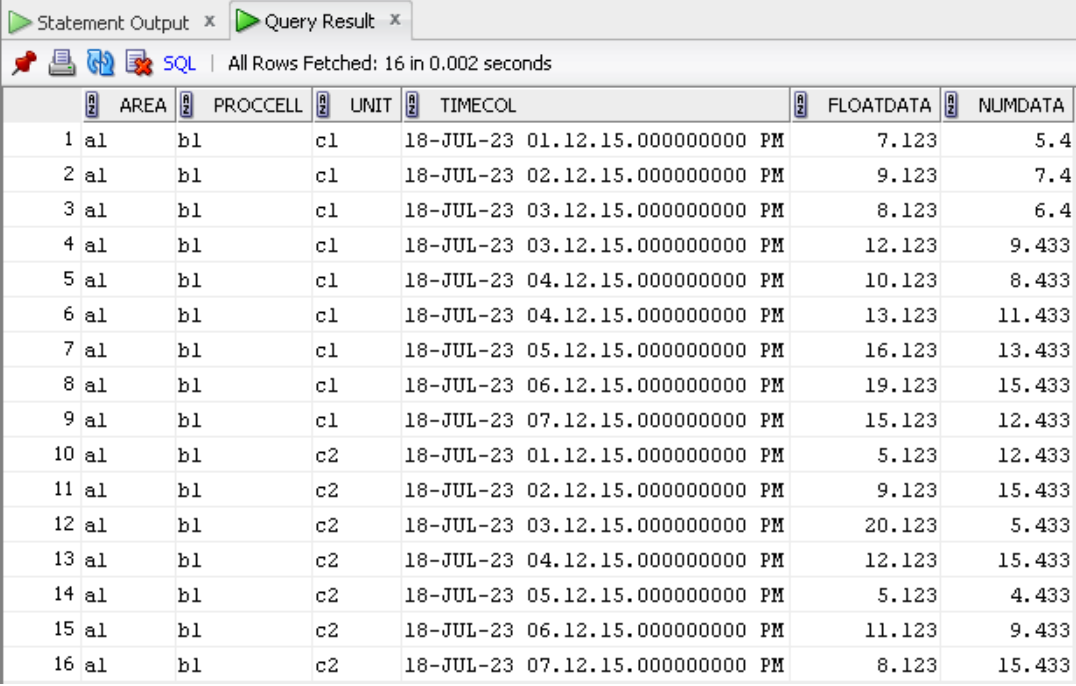
The following section is based on the sample dataset.
Column Schema
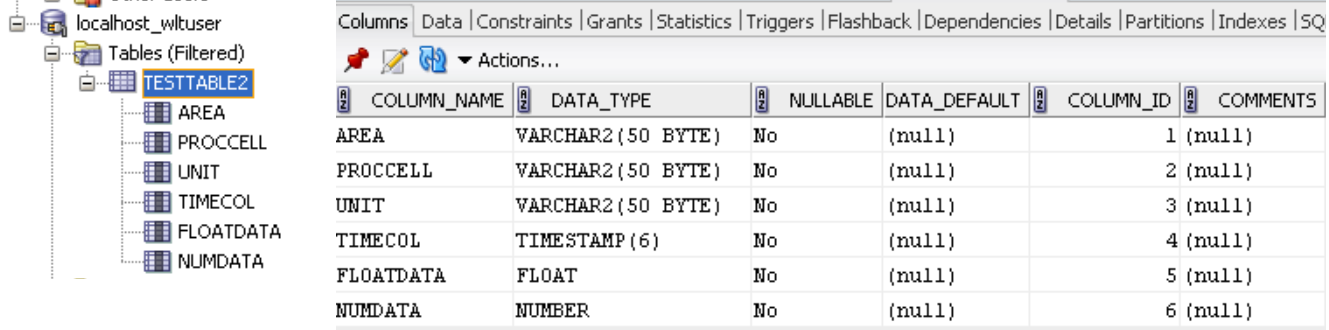
Table Data
Dataset Tags
Configuration
"datasettags": [
    {
    "name": "ora_query1",
    "query": "select * from HELP where ROWNUM <= 100",
    "datatype": "dataset"
    },
    {
    "name": "ora_query2 params",
    "query": "select * from HELP where ROWNUM <= @count",
    "datatype": "dataset",
    "parameters": {
      "@count": 15
    }
    },
    {
    "name": "ora_query3 decimal",
    "query": "select * from testtable2",
    "datatype": "dataset",
    "isgmttime": false
    }
]
IOTA Vue Output - Tag Search Dialog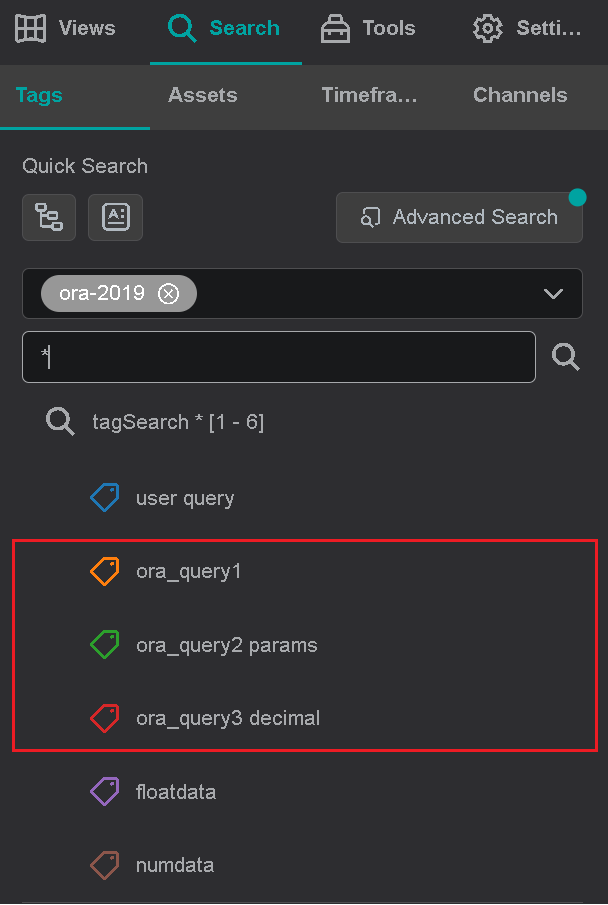
Tables - Time-series virtual tags
Configuration. Note: groupby parameter is not defined.
"tables": [
  {
    "name" : "testtable2",
    "schema" : "wltuser",
    "namequery" : null,
    "datacolumns" : [ "floatdata", "numdata" ],
    "datacolumnquery" : null,
    "timecolumn" : "timecol",
    "timecolumntype": "timestamp",
    "isgmttime": false
  }
]
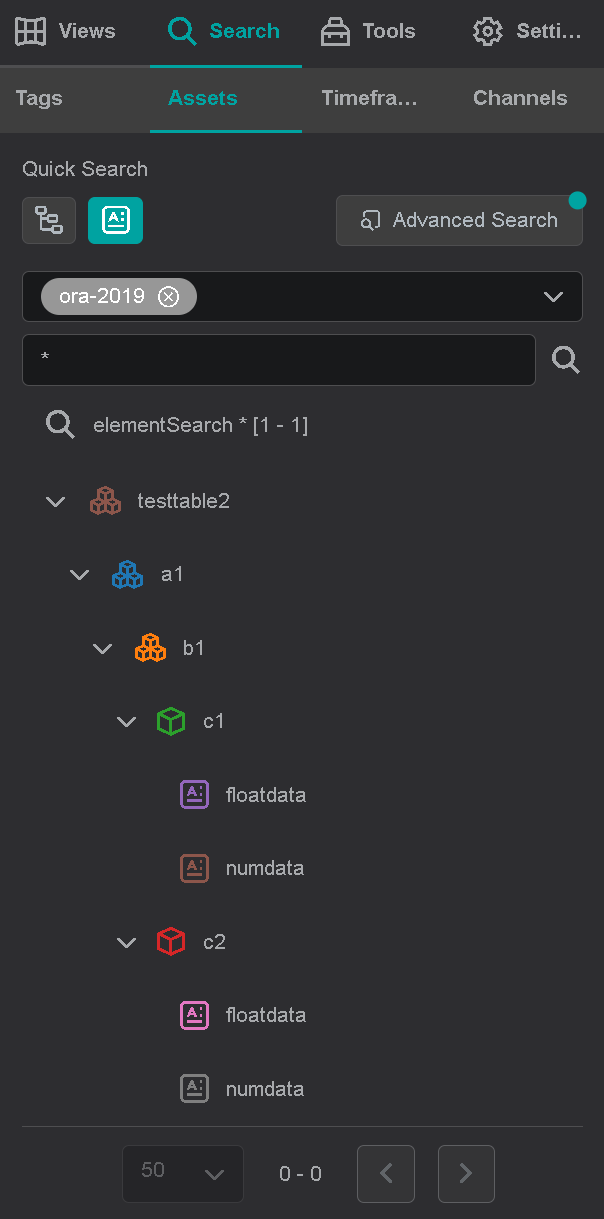
IOTA Vue Output - Tag Search Dialog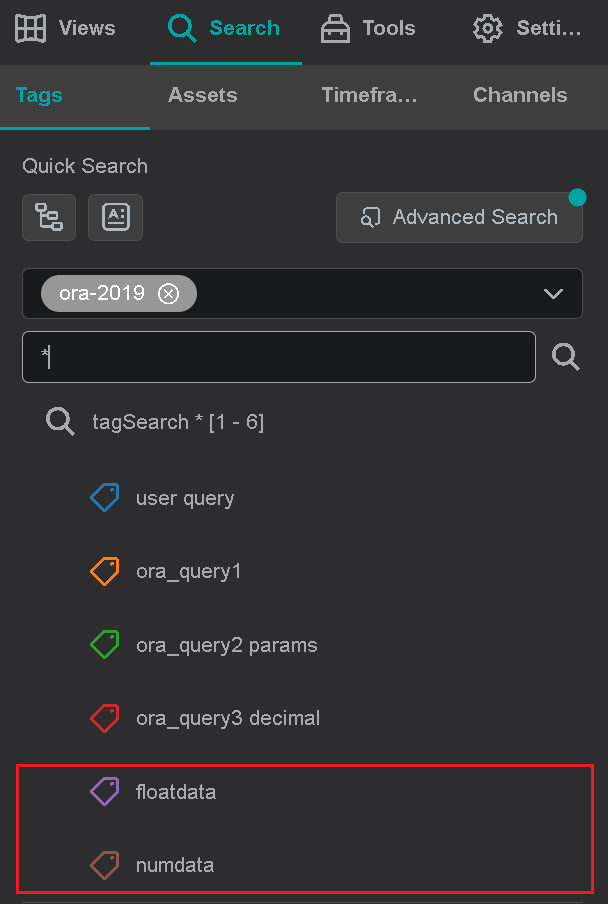
Tables - Assets with Attributes
Configuration. Note: groupby parameter is defined and is used to build the asset hierarchy
"tables": [
  {
    "name" : "testtable2",
    "namequery" : null,
    "groupby" : [ "area", "proccell", "unit" ],
    "datacolumns" : [ "floatdata", "numdata" ],
    "datacolumnquery" : null,
    "timecolumn" : "timecol",
    "timecolumntype": "timestamp",
    "isgmttime": false
  }
]
In order to build the asset hierarchy, the groupby parameter is used to generate the following query:
SELECT DISTINCT area, proccell, unit FROM testtable2 order by area, proccell, unit
Oracle result dataset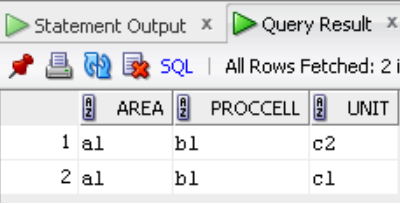
IOTA Vue Output - Asset Search Dialog