
Architecture & Deployment
Architecture & Deployment
How IOTA Vue is put together, where it runs, and how it reaches your data. For the setup sequence, see Getting Started as an Admin.
IOTA Vue Architecture
IOTA Vue connects to data where it lives. Your historians, databases and cloud platforms stay the systems of record: IOTA Vue retrieves values on demand rather than archiving them. Its own database holds views, users and configuration, and whatever the optional capabilities below add to that: the AI Guide says what the AI features store.
- IOTA Vue platform: web application, API, message bus and configuration database, plus the optional IOTA Stage service, which holds a curated asset model.
- IOTA Drivers: one per source system type. On-site drivers run on your hosts next to data that is not internet-reachable; platform-side drivers run beside the platform for cloud sources. All connect outbound only.
- IOTA Stream (optional): batch, asset and time-series calculations, installed on your side.
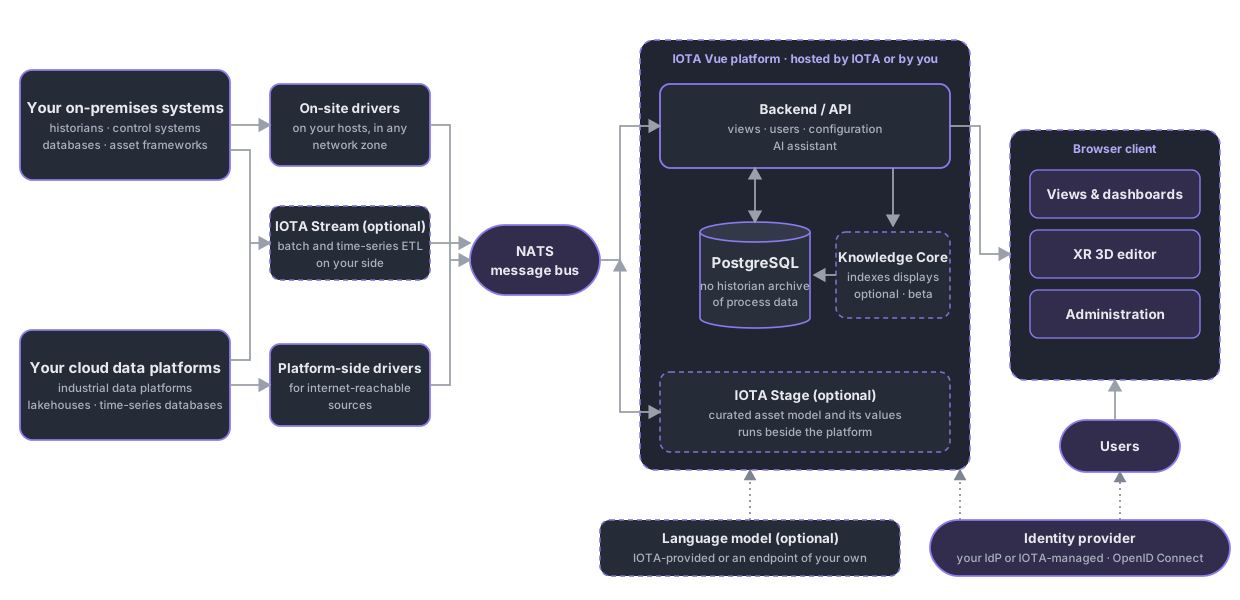
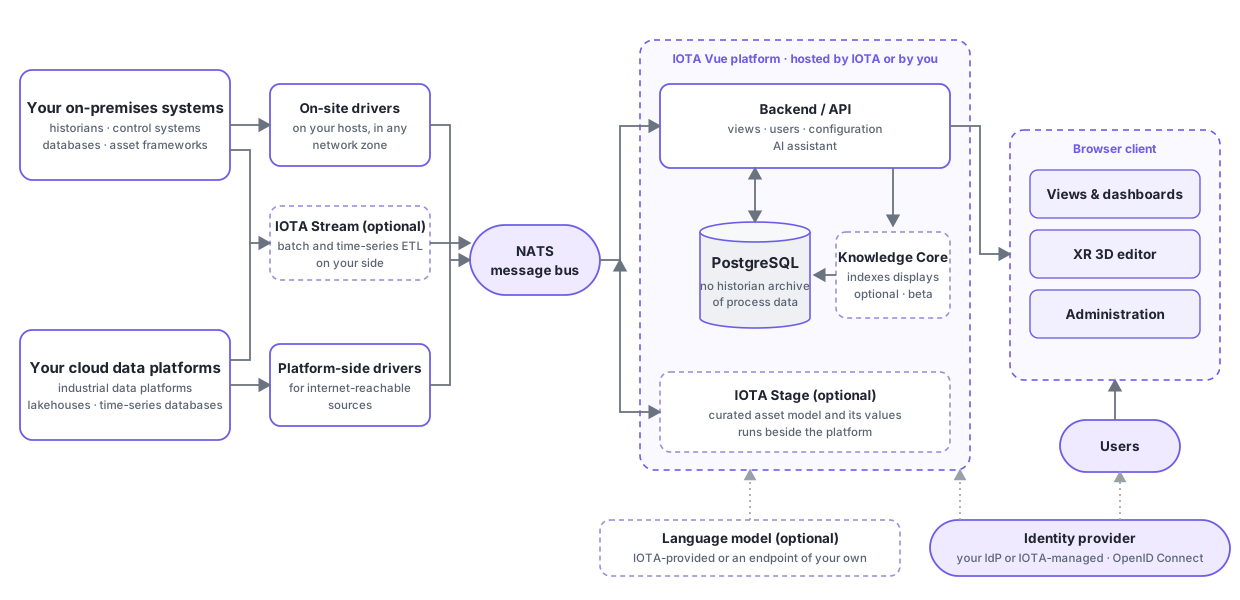
Drivers answer to the back end over the NATS message bus; the back end serves displays to the browser and keeps configuration in a local database. Each signal is fetched once and shared with every viewer, so load on your sources follows the number of distinct signals, not the number of users.
Deployment Options
One set of container images, two hosting models. Drivers follow the data in both.
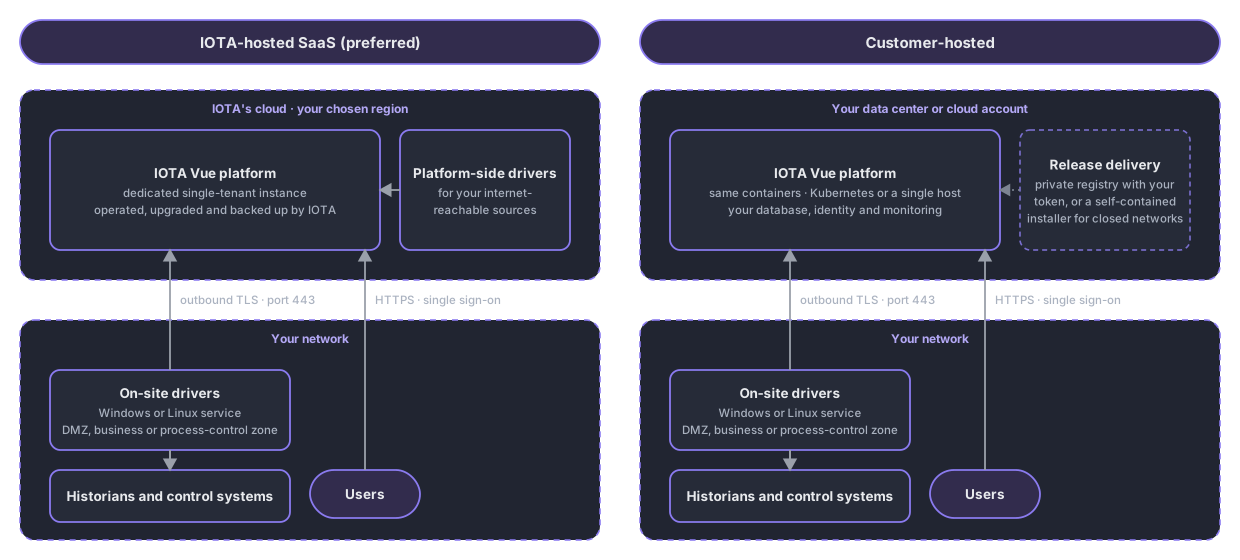
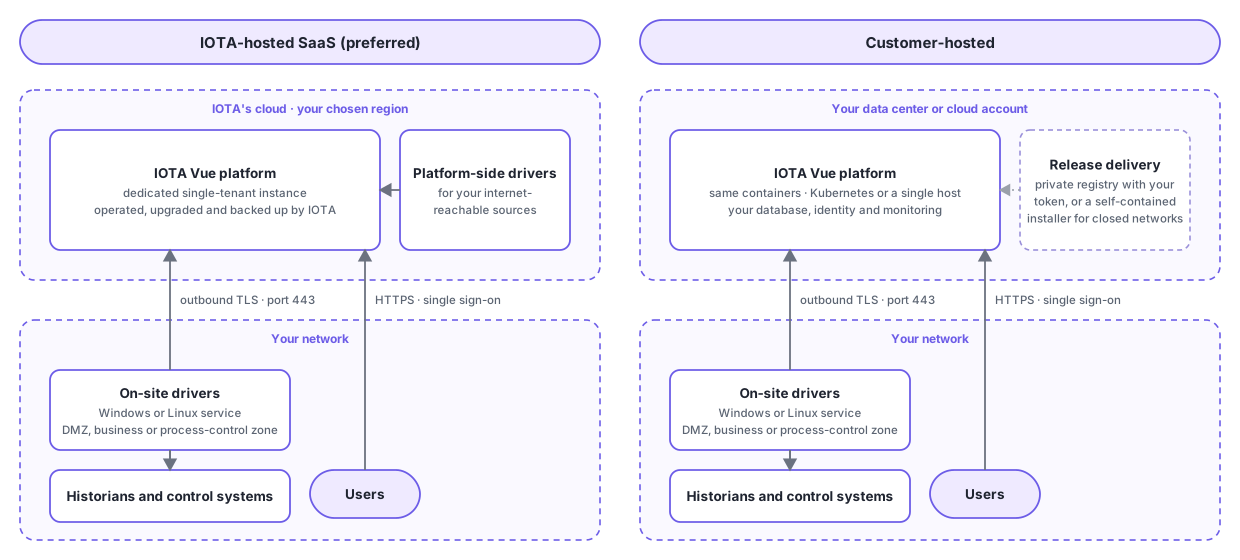
- IOTA-hosted SaaS (preferred): a dedicated single-tenant instance in the cloud region you choose. IOTA operates upgrades, certificates, monitoring, scaling and daily backups.
- Customer-hosted: the same containers on your Kubernetes cluster (recommended) or a single Linux host with Docker Compose or Podman. Closed networks are supported through a self-contained installer. Same release train as SaaS; assisted upgrades by support tier.
- On-site drivers (both models): a driver on your host in the DMZ, business or process-control network connects out over one TLS connection on port 443. No inbound rule, VPN or static IP. Network details are in Getting Started.
Identity and Access
Sign-in is delegated to an OpenID Connect provider: yours (Microsoft Entra ID, Okta and others) or a tenant managed by IOTA. Multi-factor authentication and session policy stay in the provider; IOTA maps your groups to IOTA Vue roles. See Authentication.
Optional Capabilities
| Capability | What it does | Where it runs |
|---|---|---|
| IOTA Stage | A curated asset model (hierarchy, templates and attributes) and the values bound to it, read through the same driver protocol as any other source. Not a system of record for plant data. | Beside the platform |
| IOTA Stream | Scheduled Python calculations over time-aligned channels, fanned out across assets; results to historians, files or databases | On your side |
| Knowledge Core (beta) | Indexing you start on a view, which records what it is about and which assets and tags appear where. It sends a capture of the view to the model | Inside the platform |
| AI assistant (beta) | Chat that finds displays, opens trends and drafts views through tools and administrator-authored skills, with the signed-in user's permissions and their confirmation before anything is created or changed | Inside the platform; language model IOTA-provided, or an endpoint of your own, cloud or self-hosted |
| Display migration | Bulk conversion of existing HMI and historian displays, or live reference views | Utility on your side; live path in the drivers |
| 3D displays | Plant and building models from CAD and BIM tools, rendered in the browser and bound to live data | In the browser |
QA and Production Environments
Most customers run separate QA and Production environments so displays and configuration can be validated before they reach operators. Two topologies are supported:
- Two separate instances (recommended): a dedicated QA instance and a dedicated Production instance, each with its own set of drivers. This gives full isolation: you can test drivers, data and display changes in QA without any risk to Production.
- Shared back end: a separate QA front end that reuses Production's IOTA database and drivers (the same API). This needs less infrastructure to deploy, but because QA and Production share the same data and configuration, testing is limited: you cannot validate driver or data changes in isolation.
Warning
For copied displays to bind to data correctly, the driver topics must match between the QA and Production instances. If the topics differ, the copied displays will still load, but their data bindings will need to be reconfigured for the target environment.
What's Next
With the architecture and deployment model in mind, continue to Getting Started as an Admin for the step-by-step setup sequence.
Related
- Getting Started as an Admin: the step-by-step setup sequence
- Administration Page: manage users, drivers and features
- Data Sources: connect IOTA to your data systems
- Authentication: set up single sign-on
- Migration Tools: bring existing displays across
- AI Guide: what the AI features do, and what is sent to the model