
Feature Flags
Feature Flags
The Feature Flags area of the Administration Page lets administrators turn platform features on or off. Flags let IOTA ship features that are still being rolled out, so you can enable them when you are ready. Changes take effect the next time the page is reloaded.
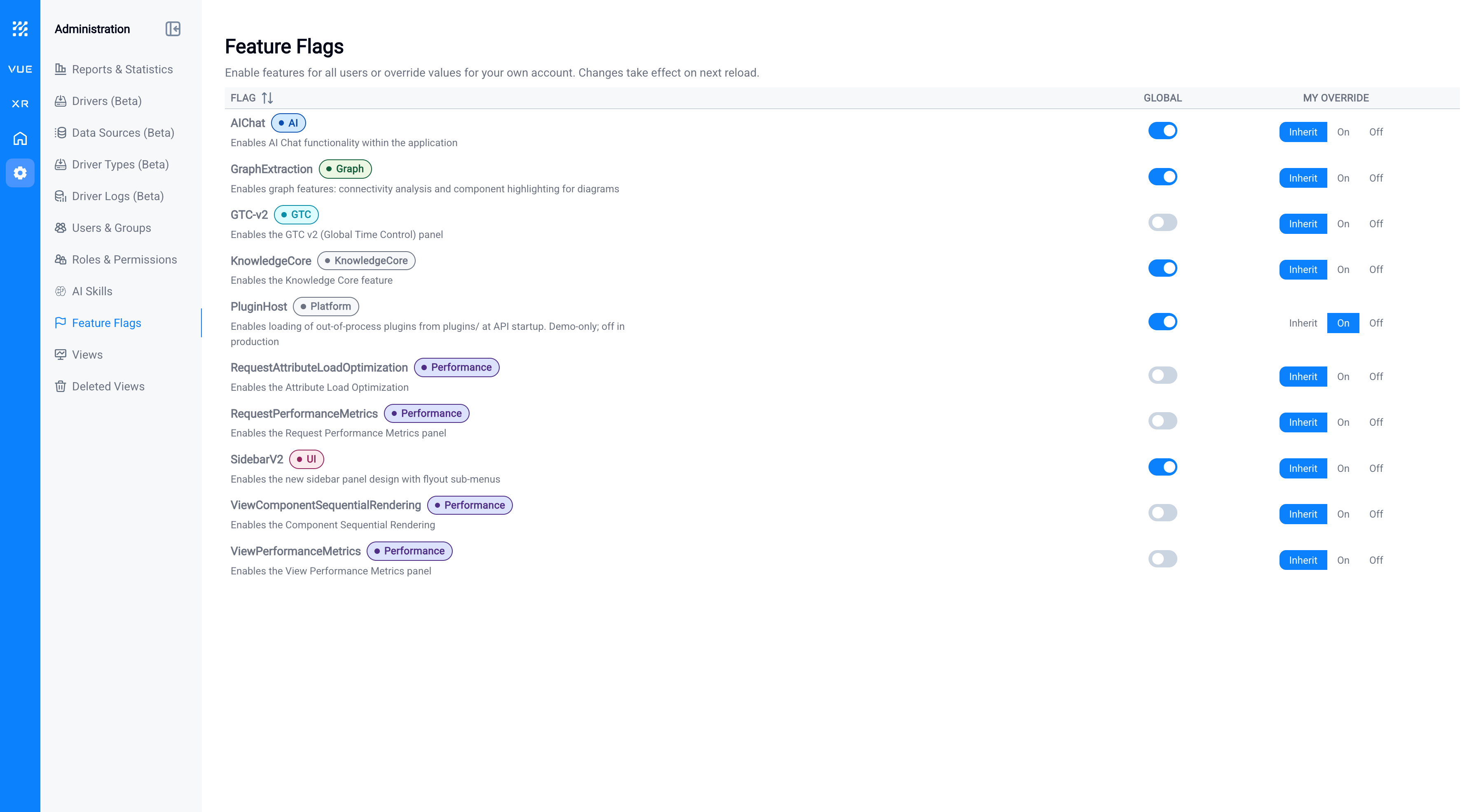
Each flag has two controls:
- Global: the on/off value applied to all users of the instance.
- My Override: overrides the global value for your own account only: Inherit (follow the global value), On, or Off. Use this to try a feature yourself before enabling it for everyone.
Available feature flags
The Status column tells you which flags are safe to use. Recommended flags should be turned on for the workflow noted below. Flags marked Only if guided by IOTA are off by default: leave them off unless IOTA support asks you to enable one.
Only enable these flags when IOTA guides you
Most feature flags are off by default and are used by IOTA engineering and support for diagnostics, performance tuning, and unreleased work. Do not turn them on unless the IOTA team specifically guides you to: enabling them can degrade performance or expose unfinished behavior. The one flag that is safe for you to enable on your own is SidebarV2 (see the recommendation below).
| Flag | Area | Status | What it does |
|---|---|---|---|
| SidebarV2 | UI | Recommended | Enables the new side-panel design with flyout sub-menus (see recommendation below). |
| AIChat | AI | Only if guided by IOTA | Enables the AI Chat assistant within the application. |
| GraphExtraction | Graph | Only if guided by IOTA | Enables graph features: connectivity analysis and component highlighting for diagrams. |
| GTC-v2 | GTC | Only if guided by IOTA | Enables the GTC v2 (Global Time Control) panel. |
| KnowledgeCore | Knowledge Core | Only if guided by IOTA | Enables the Knowledge Core feature. |
| PluginHost | Platform | Only if guided by IOTA | Loads out-of-process plugins at API startup. Off in production. |
| RequestAttributeLoadOptimization | Performance | Only if guided by IOTA | Attribute-load optimization for data requests. |
| RequestPerformanceMetrics | Performance | Only if guided by IOTA | Enables the Request Performance Metrics panel. |
| ViewComponentSequentialRendering | Performance | Only if guided by IOTA | Renders view components sequentially rather than all at once. |
| ViewPerformanceMetrics | Performance | Only if guided by IOTA | Enables the View Performance Metrics panel. |
Recommended settings
Using ad hoc trend saving?
If you plan to use ad hoc trend saving, we recommend turning SidebarV2 On globally. The saving and management experience for ad hoc trends lives in the new side panel, so enabling it for everyone gives all your users a consistent workflow.
Note
Managing feature flags requires the Manage global feature flags (or Manage feature flag overrides) permission, set on a role's Administrative tab.
What's Next
With the Administration Page covered, connect your data; see Data Sources to configure the connectors IOTA reads from.
Related
- Administration Page: the central admin console
- Roles, Users, and Groups: access control
- Driver Logs: data-source activity and diagnostics