
Engineering View
Engineering View
By default every component on your display is in View mode. If you need to hide construction-only components from viewers, switch them to Engineering mode: they stay visible while you build, but disappear for anyone viewing the locked display. Toggle Engineering View with the  button in the top bar.
Video reflects an earlier version
The example video below was captured on an earlier build. The View ↔ Engineering workflow is unchanged, but its UI may look slightly different from your version.
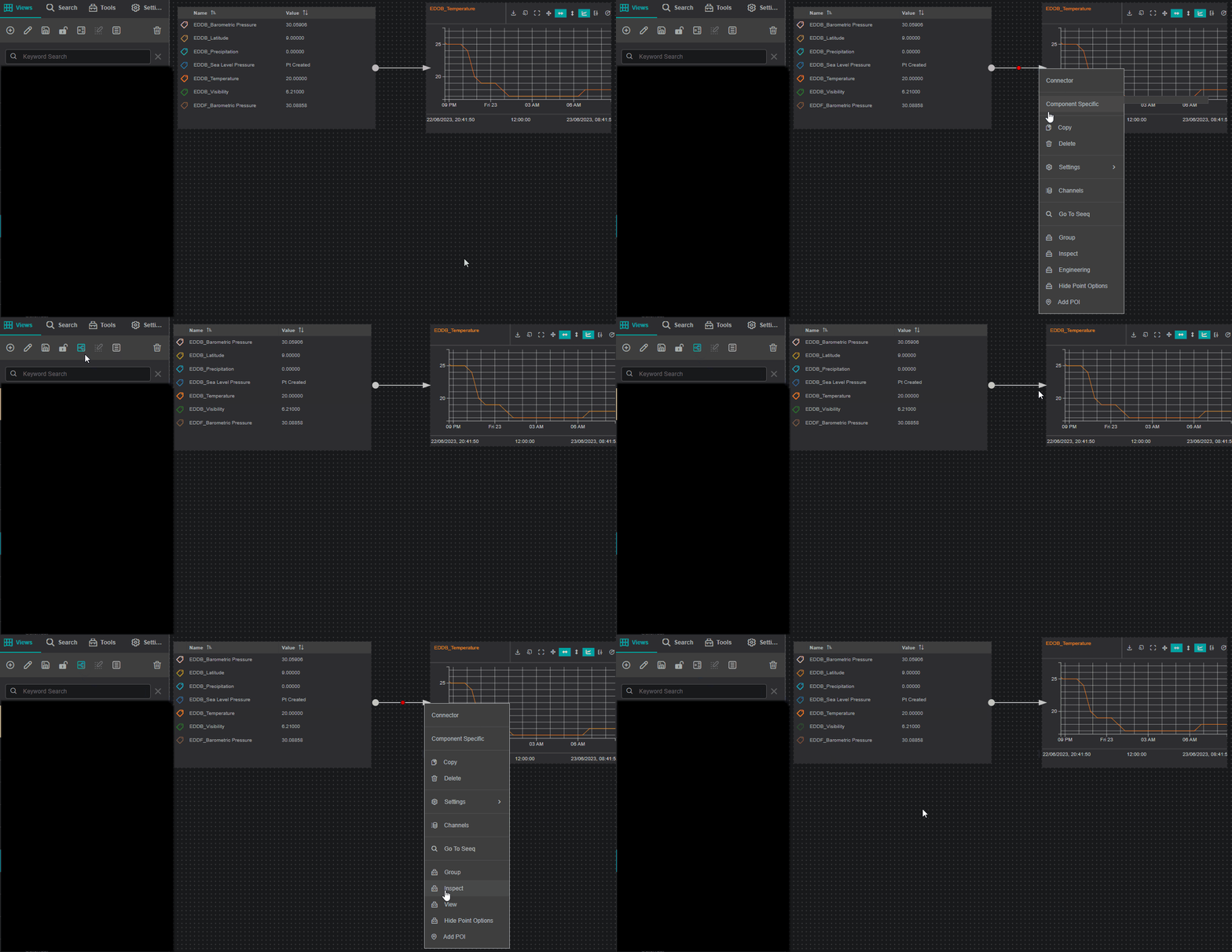
The example below hides a connector: the connector is switched to Engineering mode while the other components stay in Normal (View) mode.
The video shows the following steps:
- Move the Connector to Engineering view: the connector disappears in View mode.
- Switch to Engineering view: the connector is visible.
- Switch back to Normal view: the connector is hidden.
- Switch back to Engineering view.
- Move the Connector back to Normal view by clicking View.
- Switch to Normal view: the connector is visible again.
What's Next
With your display polished for viewers, browse the Components Reference for the full settings of every component.
Related
- Advanced: advanced builder features
- Finishing & Sharing: publish and share the display
- Building First Display: the basics of building a display