
TimeFrame Patterns
TimeFrame Patterns
An asset pattern answers which equipment. A TimeFrame pattern
answers which production events: batches, campaigns, phases, downtime events. It
matches AVEVA event frames the way an asset pattern matches assets.
Open Patterns from the Stream menu, select Add Pattern, and choose
TimeFrame Pattern.
TimeFrames, event frames, and the batch model
In AVEVA AF, a stretch of production with a definite start and end is an event
frame: a named interval that carries its own attributes and points at the
equipment it ran on. Stream calls that same object a TimeFrame. The two words
describe one record: this guide says event frame when the subject is what AF
stores, and TimeFrame when the subject is what Stream reads.
What an event frame represents is a decision your site already made. In a batch
plant the levels normally follow the ISA-88 procedural model, with a procedure
at the top, unit procedures beneath it, and operations and phases
beneath those — one TimeFrame per level. AF does not impose that shape. Sites reporting to ISA-95 use
the same mechanism for campaigns, production runs and work orders, and
continuous plants use it for downtime events, grade transitions and excursions.
A TimeFrame pattern reads all of them without being told which it is looking at,
because at the level the pattern works they are identical: a named interval with a
start, an end, attributes of its own, and a link to the equipment that ran it.
Why event frames, not fixed intervals
Most process reporting is not really about clock time. It is about what the plant
was making.
"The average temperature every ten minutes" is a question about a fixed interval.
"The average temperature of each batch" is a question about an event frame, and
the two produce very different tables. The first gives you a row every ten minutes
whether anything was running or not. The second gives you one row per batch, with
the batch ID beside it, and nothing at all while the line was idle.
A TimeFrame pattern is how you ask the second kind of question. Each TimeFrame it
matches becomes one match for the task, read over that TimeFrame's own span:
so a batch that ran for six hours is read across six hours, and the one that ran for
forty minutes across forty minutes.
What a TimeFrame pattern is made of
A pattern is a small tree. Four kinds of node, and each has its own key prefix:
| Node | Key | What it is |
|---|---|---|
| TimeFrame | tf1, tf2 … | An event frame the pattern matches |
| TimeFrame attribute | ta1, ta2 … | An attribute on the TimeFrame: a batch ID, a product code, a recipe step |
| Referenced asset | re1, re2 … | An asset the TimeFrame points at: the unit the batch ran on |
| Asset attribute | ra1, ra2 … | An attribute on that referenced asset: its temperature, its pressure |
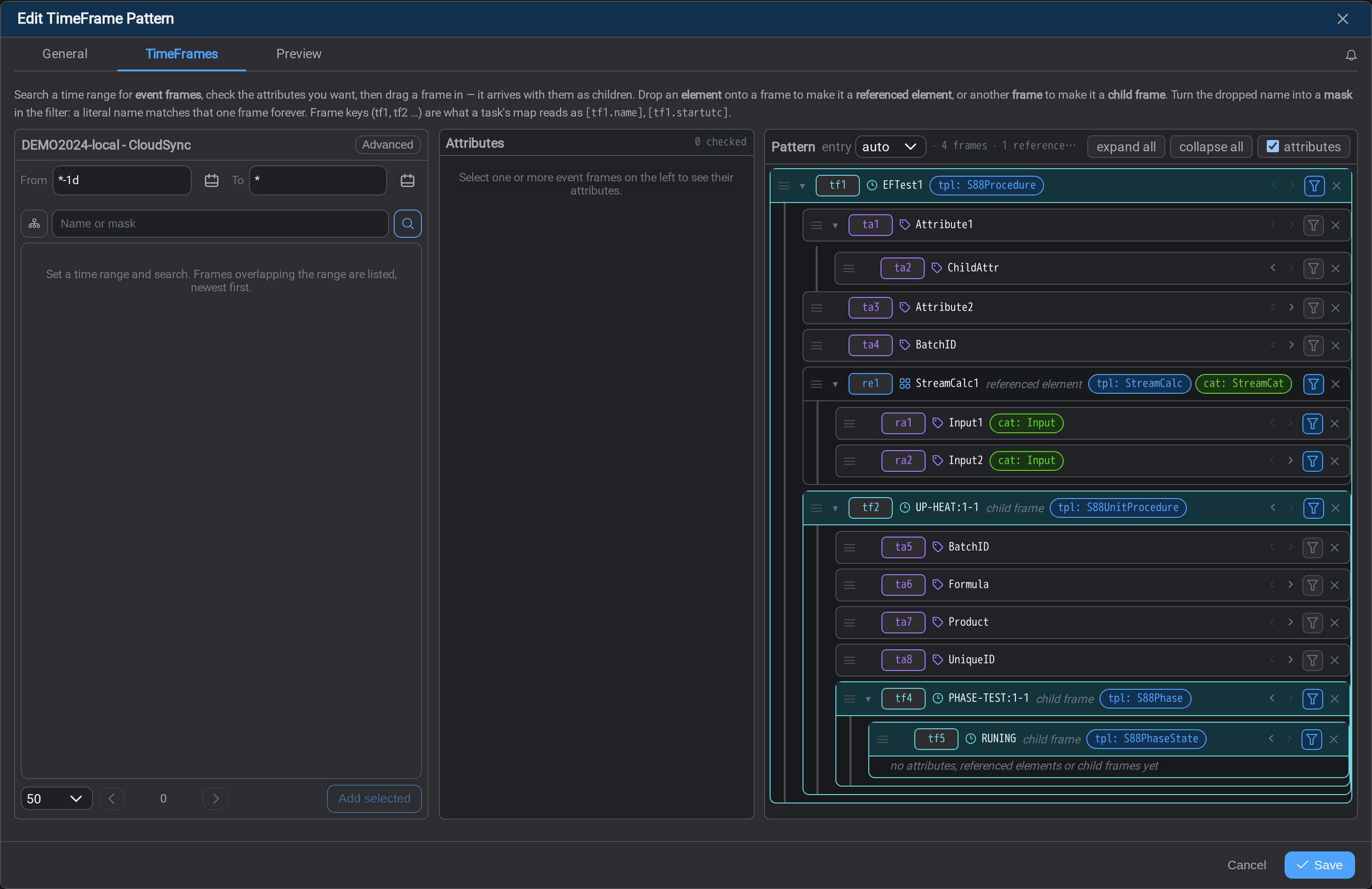
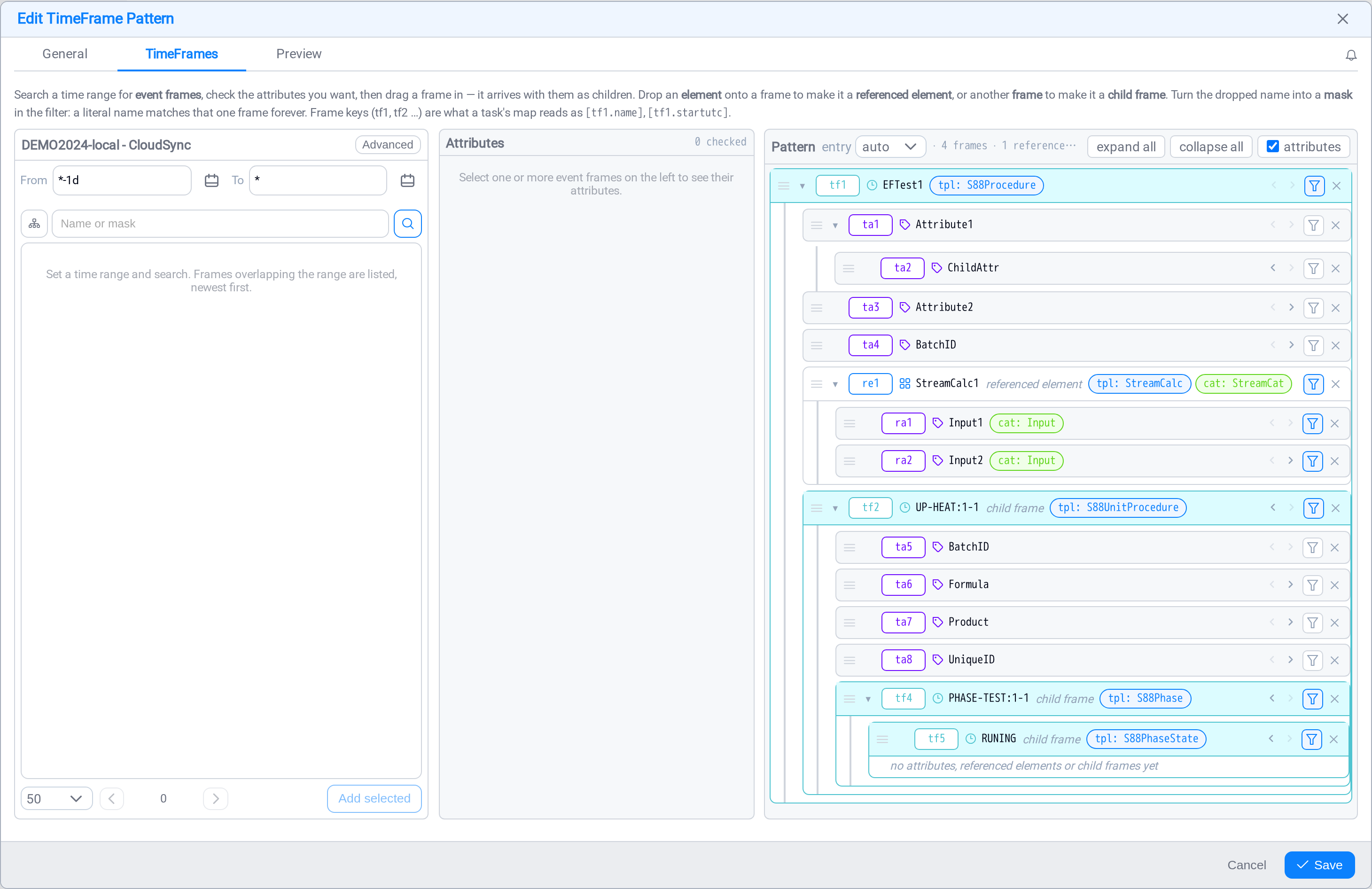
Those keys are how the rest of the task refers to the pattern: a mapping column
reads [tf1.name] or [ta4.value], and a script names them as variables. They are
editable, but the defaults are chosen so they never collide with an
asset pattern's own e1 / a1 keys: which matters, because a task
that binds both patterns draws its keys from both into one namespace. A key used
twice makes the map ambiguous and the service refuses the task.
Read the prefix, know the source
[e1.name] is the asset pattern. [re1.name] an asset the TimeFrame references.[tf1.startgmt] is the TimeFrame itself, [ta1.value] one of its attributes and[ra1.value] one of that asset's. The prefix tells you which half of a combined
task a value came from without going back to the pattern.
Matching a nested hierarchy
Event frames nest, and in a batch plant the nesting is the ISA-88 procedural model
described above: the procedure is the batch, and the unit procedures,
operations and phases beneath it are TimeFrames in their own right, each with
its own span and attributes. A pattern walks that hierarchy the same way an asset
pattern walks an asset one, and the same walk serves an ISA-95 campaign holding
its production runs, or whatever nesting your AF server was configured with.
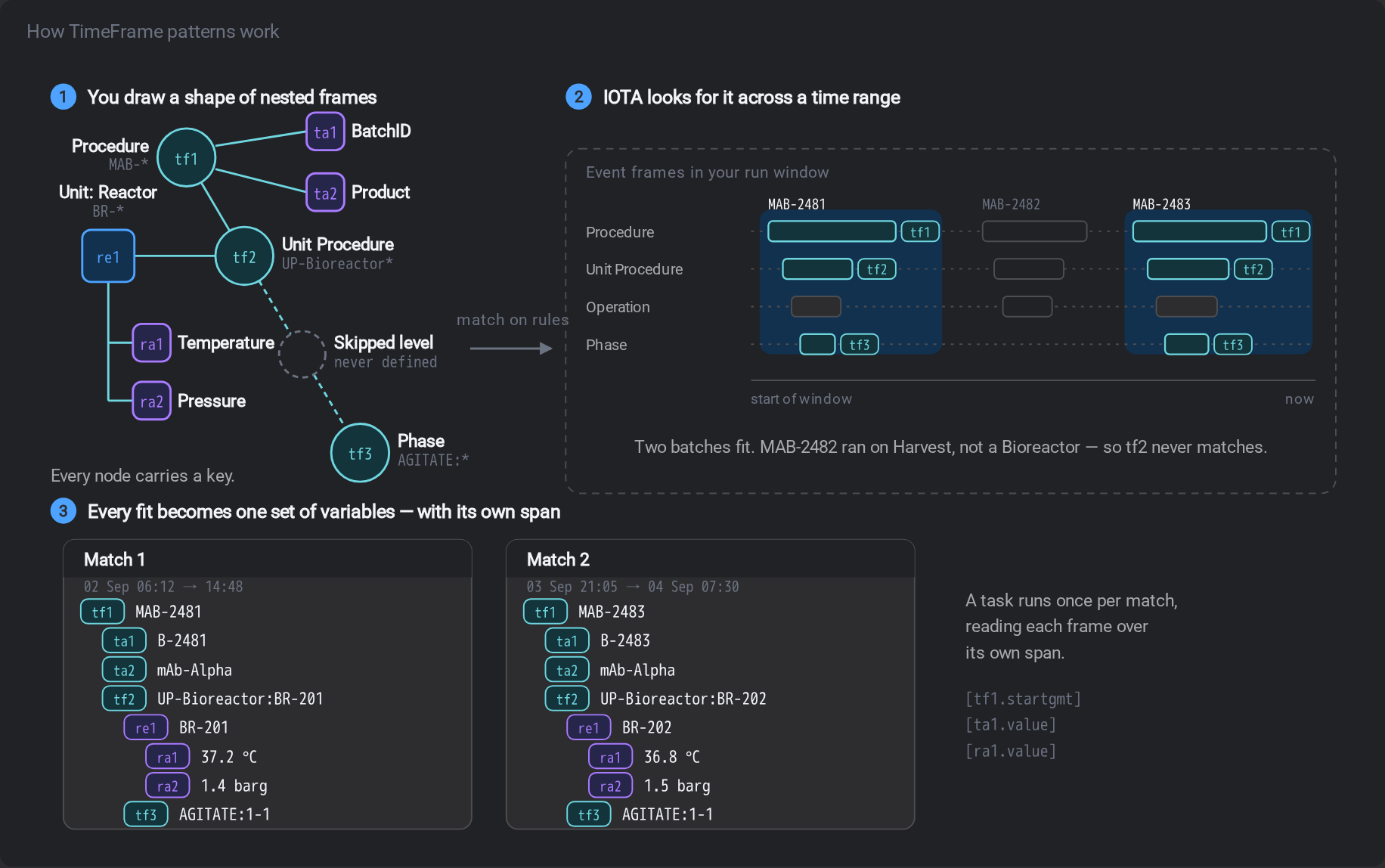
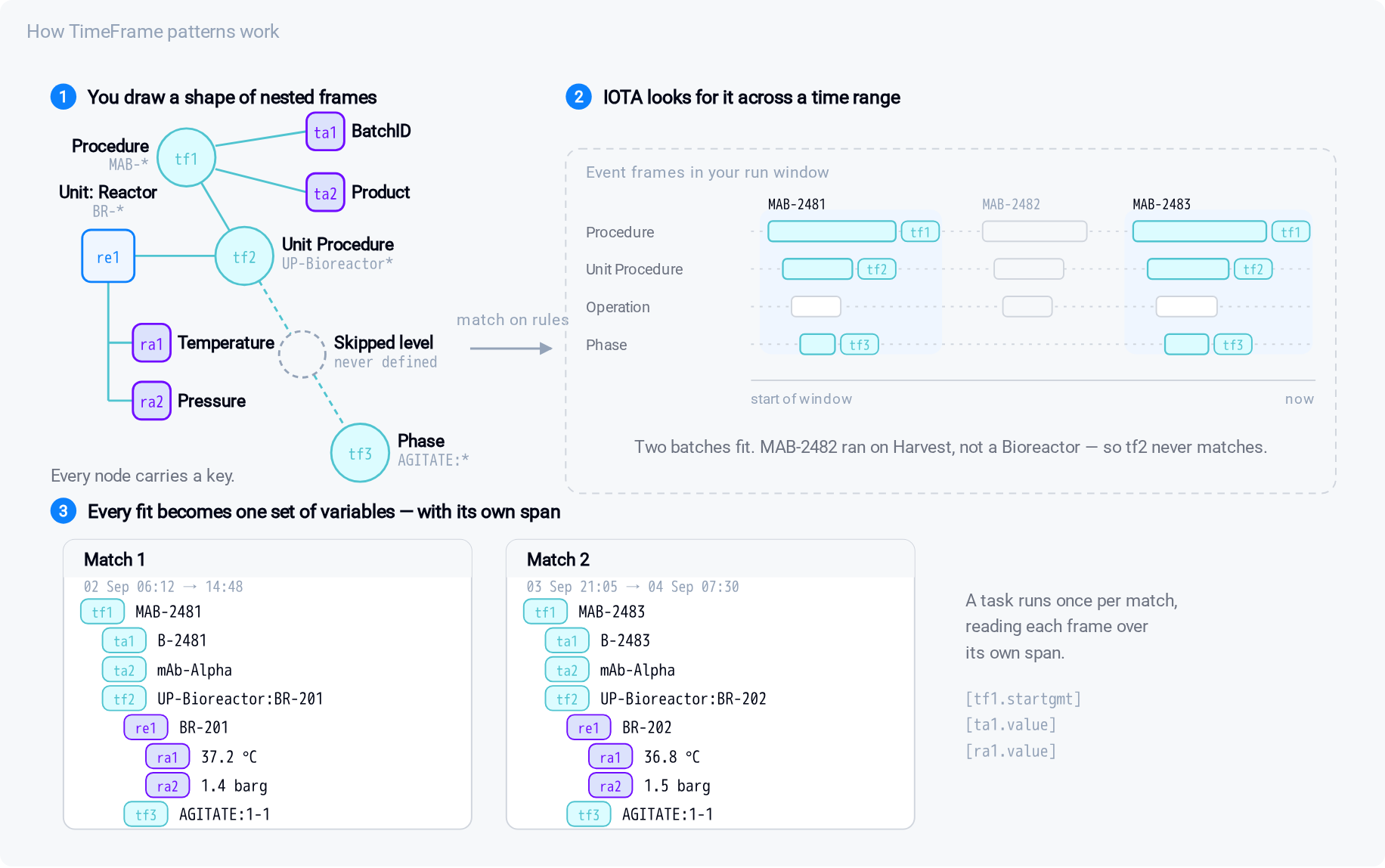
Each level you add narrows what matches and adds what you can read. A pattern of one
TimeFrame matches every batch. The same pattern with a child TimeFrame beneath it
matches only batches that have that child, and gives you the child's own span and
attributes alongside the parent's.
Building one
The builder has three panes: search on the left, the attributes of whatever you have
selected in the middle, and the pattern itself on the right.
Finding TimeFrames
The search pane looks for event frames on the endpoint, and it takes a time
window as well as a name. An event frame exists only between its start and end time,
so "batches called UP-*" is not a complete question until you say when.
| Control | What it does |
|---|---|
| From / To | The window to search. A TimeFrame is found if it overlaps it |
| Name or mask | UP-HEAT* matches every heating step |
| Search hierarchy | Look through child TimeFrames as well as the top level |
| Advanced | The driver's full search: template, category, attribute values, sort order |
Results arrive as a tree. A TimeFrame that has children shows a twisty; expanding it
fetches its child TimeFrames and the assets it references, so the hierarchy you
are matching is the hierarchy you can see.
Adding to the pattern
Drag a row into the pattern pane, or select several and use Add selected. What
you drag decides what you get:
- a TimeFrame becomes a
tfnode; - an attribute attaches to the node you drop it on;
- a referenced asset becomes an
renode, and its own attributes can be
added under it.
Dropping a TimeFrame onto another makes it a child. Dropping it on the root zone
at the bottom makes it a sibling at the top level. Every node also has ‹ and› controls to move it in and out a level without dragging, which is the reliable
way to fix a tree that came out flat.
What each node matches
Select a node and the middle pane shows what it will match on: its name or mask, and
any attribute conditions. A tf node can also be told to match only TimeFrames from
a particular template or category, which is usually the cleanest way to say
"unit procedures, not phases" without depending on the names people typed.
Using one in a task
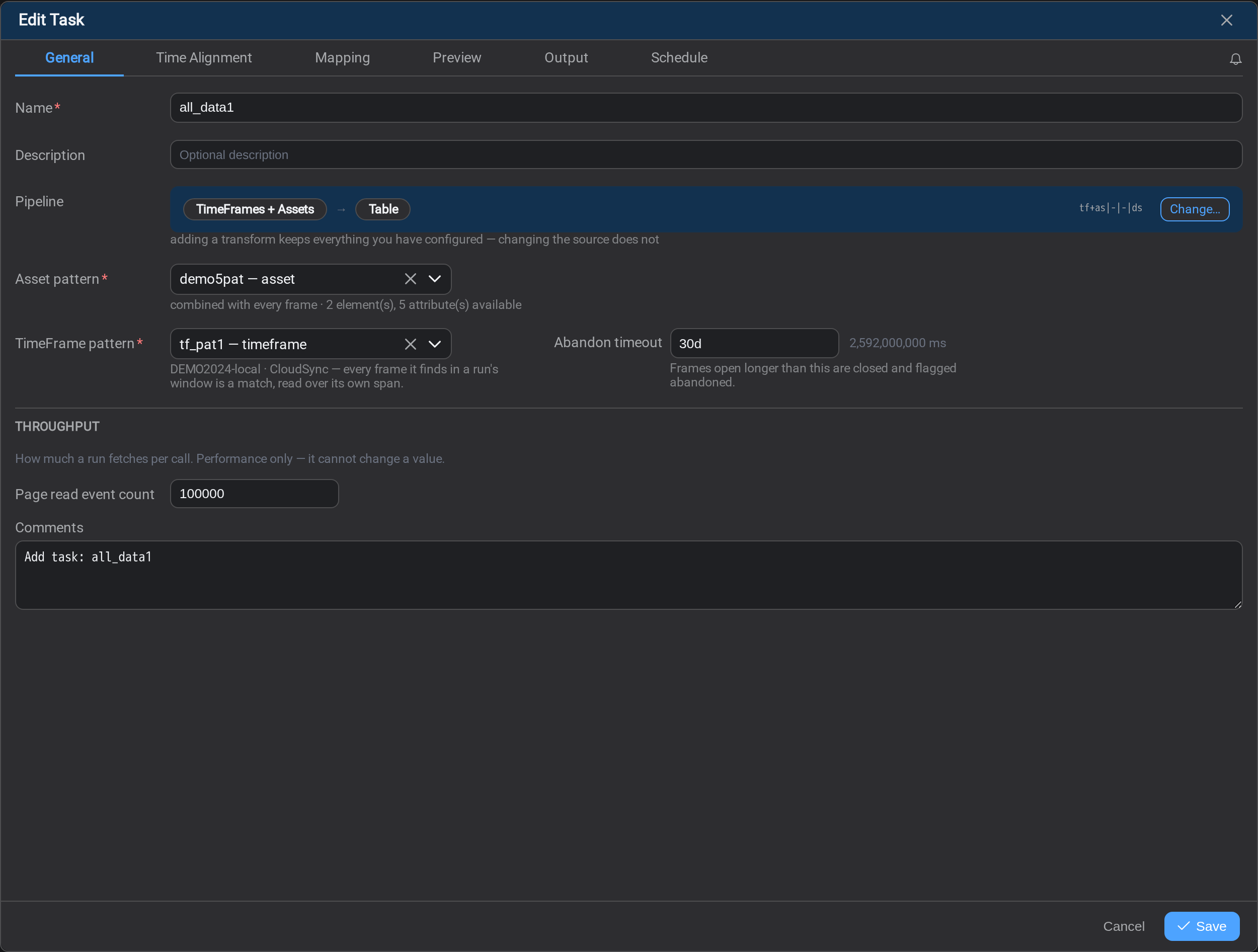
A TimeFrame pattern does nothing on its own. A task picks it up by ticking
TimeFrames in the pipeline composer and choosing
the pattern on the General tab.
Abandon timeout
An event frame that never closes would hold the task's watermark for ever: the run
cannot move past a window that is still open. The abandon timeout is the answer:
a TimeFrame open longer than this is closed and flagged abandoned, and the task moves on.
It defaults to 30 days, which is longer than any normal batch and still bounded.
Setting it to 0 disables the check entirely: open TimeFrames are then never ignored,
whatever their age, and one stuck TimeFrame can stall the task indefinitely.
What a TimeFrame contributes
Seed a mapping from a TimeFrames task and the frames bring their names first, one
column each, so the row reads as the path down the tree: batch, then phase, then
step. The time columns come from the leaf, the innermost frame, because that is
the one that says when the thing being measured actually ran; a parent merely contains
it. Attributes and referenced assets' attributes follow as values.
The span is available in several spellings, and which you want depends on what the
column is for:
| Spelling | Type | Use it for |
|---|---|---|
startgmt / endgmt | datetime | Reading, and for naming a table or a file: .Format= works on these |
startlcl / endlcl | datetime | The same, in server-local time |
startutcsec / endutcsec | number | Epoch seconds, for arithmetic |
startutcmsec / endutcmsec | number | Epoch milliseconds |
durationsec / durationmsec / duration | number / number / text | How long the frame ran: the last as 01:00:00 |
elapsedmsec / elapsedsec / elapsed | number / number / text | How far into the frame this row is: the last as [d.]hh:mm:ss |
A TimeFrame that is still open reports its end as a far-future sentinel rather than
a blank, so end > start always holds.
Elapsed, and why it is the one that works live
duration and elapsed sound alike and are not.
duration is the frame's whole span: the same on every row of that frame, and
not final until the frame closes. elapsed is the row's own time measured from the
frame's start, so it grows row by row while the frame is still running.
That difference is why the seeded mapping carries elapsed rather than duration. A
scheduled task spends its life reading frames that are still open, and on an open
frame duration has nothing settled to say. elapsed is meaningful from the frame's
first row. Duration remains available for the reports that want it.
Three rules apply:
- It is available on every frame key of the match.
[tf1.elapsed]is the time
since the batch started and[tf3.elapsed]the time since the phase did, on the
same row, so a row can carry how far into each level of the tree it is. - A lookback row is negative, not clamped. A reading fetched before the frame
started really is earlier than it, and flooring that at zero would put lookback rows
and the frame's first row at the same value. - It exists on frame keys only. Ask an element or attribute key for it and the
cell compiles empty, with the reason recorded in the run's messages.
Combining TimeFrames with assets multiplies them
Tick TimeFrames and Assets together and every TimeFrame is paired with every
asset the pattern matches: a cross product, not a join. That is exactly what "these
readings, for this batch" needs. Check the match count before you combine a thousand
TimeFrames with a thousand assets.
Common problems
The pattern matches nothing.
Check the search window first. A pattern is matched against each run's own window,
so a pattern that found TimeFrames while you were building it can match nothing on a run
whose window contains no matching event frames: an idle shift, or a campaign that
had not started yet.
A child TimeFrame came in at the top level.
Dragging several rows at once places each where it was dropped. Use ‹ and › on
the row to indent it under its parent: indenting makes a node the child of the
sibling above it.
A task refuses to save with a key clash.
The task binds this pattern and an asset pattern, and both auto-keyed the same name.
Rename the key on one of them: the message names both sides.
The task's watermark will not move past a date.
An open TimeFrame is holding it. Check the abandon timeout; a task set to 0 waits
for that TimeFrame for ever.
What's Next
Put one to work: Tasks →
Related
- Asset Patterns: the asset half, and the page most of this mirrors
- Tasks: ticking TimeFrames as a source
- Task Scheduler: the watermark a stuck TimeFrame holds
- Mapping: where a TimeFrame's span becomes columns