
Navigation functions move the viewer between displays, or out to an external URL. You normally wire them in the Navigation tab of a component's Actions panel (on the onClick and onDblClick triggers), and each one is just a script you can call directly, or read and edit on the Script tab. This page is the scripting reference; for the full Function-dropdown list see Navigation Functions (reference), and for each function's parameters and supported components see Component Scripts.
Tips
Navigation is a user action, so it runs on triggers like onClick or onDblClick, and is blocked during onCreate and onData (the view is still loading or refreshing data).
Example: open a detail view in a popup
Everything you wire in the Navigation tab is a script underneath, so a navigation you built in the UI can just as easily be written by hand. On the Heat Exchanger display, double-clicking the schematic opens that exchanger's detail view in a popup. Configured in the Actions dialog, the SVG's onDblClick generates this on the Script tab:
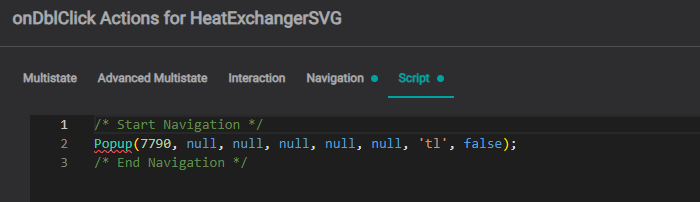
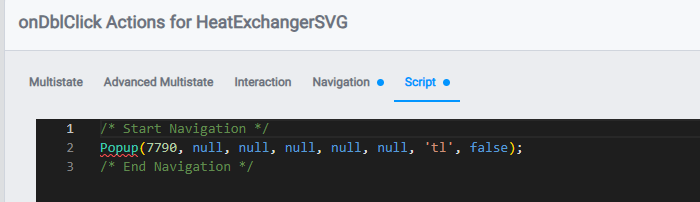
Popup(7790, null, null, null, null, null, 'tl', false);It's the SVG double-click → popup example from Navigation Between Displays, built through the UI. The functions below are the building blocks.
GoTo
Navigate from one view to another by name.
| Function Name | Parameter Name | Type | Required | Description |
|---|---|---|---|---|
GoTo | View Name | string | 🟢 | to which view to jump |
GoTo('demo view');Warning
All views must be uniquely named.
GoToId
Navigate to a view by its numeric ID. Useful when a view name isn't unique, or when the ID is known (the same ID Popup takes).
| Function Name | Parameter Name | Type | Required | Description |
|---|---|---|---|---|
GoToId | View ID | number | 🟢 | numeric view id |
GoToId(7790);GoToPath
Navigate to a view by its folder path.
| Function Name | Parameter Name | Type | Required | Description |
|---|---|---|---|---|
GoToPath | View Path | string | 🟢 | folder path to the view |
GoToPath('Building Guide/HEX Details - Actions');GoToUUID
Navigate to a view by its UUID: the most stable reference, unaffected by renames or moves.
| Function Name | Parameter Name | Type | Required | Description |
|---|---|---|---|---|
GoToUUID | View UUID | string | 🟢 | view uuid |
GoToUUID('ded610d4-b513-4a1b-864e-10da00256a3d');GoToUrl
Navigate to a user-specified URL address.
| Function Name | Parameter Name | Type | Required | Description |
|---|---|---|---|---|
GoToUrl | URL address | string | 🟢 | User-defined web page address |
GoToUrl('https://www.google.com');Popup
Opens a view in a floating popup window instead of navigating away from the current display. The first parameter is the target view (by ID); the remaining parameters control the popup's placement and behavior (for example, 'tl' positions it top-left). See the example above.
Popup(7790, null, null, null, null, null, 'tl', false);GoBack
View-history navigation. Returns to the previously visited view.
| Function Name | Parameter Name | Type | Required | Description |
|---|---|---|---|---|
GoBack | N/A | - | - | - |
GoBack();GoForward
View-history navigation. Moves to the next visited view, if available.
| Function Name | Parameter Name | Type | Required | Description |
|---|---|---|---|---|
GoForward | N/A | - | - | - |
GoForward();GoToSeeq
Navigate to Seeq Workbench. All channels associated with the currently selected component are passed to Seeq.
| Function Name | Parameter | Type | Required | Description |
|---|---|---|---|---|
GoToSeeq | IOTA Component | object | 🟢 | In version 1.0 - the only possible parameter: this.container |
GoToSeeq(this.container);Refresh
Reloads the current view's configuration from the database.
| Function Name | Parameter Name | Type | Required | Description |
|---|---|---|---|---|
Refresh | N/A | - | - | - |
Refresh();What's Next
Next, see Passing Context to carry data and selections between displays.
Related
- Navigation Functions (reference): the complete Function-dropdown catalog (
GoTo,GoToId,GoToPath,GoToUUID,GoToUrl,Popup, …) - Navigation Between Displays: configuring navigation actions, with worked examples
- Passing Context: carry a selection into the target view with
SetOptions/GetOptions - Component Scripts: each function's parameters, execution context, and more examples
- KB articles: Navigation Functions · Navigation · Basics: Functions · IOTA Functions, Global & Component Properties