
Channels
Channels
A channel is one specific thing to read: a named PI tag, or one named AF
attribute. You list them yourself, and the list is exactly what the task reads.
That is the opposite of a pattern, which describes a shape and finds
whatever matches. Both are valid sources, and a task can use either or both.
The Channels tab appears when the task's source is Channels or Pattern +
Channels.
The three ways to source a task
This is the choice you made on the Add Task: Select Type dialog, and it is worth
restating here because the Channels tab is what two of the three depend on.
| Source | Reads | Use it when |
|---|---|---|
| Channels | A fixed list of tags or attributes | You know exactly which points you want, and the list is not going to grow on its own |
| Pattern | Every combination a pattern matches | You want the same work repeated across many assets |
| Pattern + Channels | Both: the pattern's matches, plus fixed channels available to every one of them | Per-asset work that also needs a value from somewhere outside the pattern |
Channels on their own
You do not need assets at all. If the data you want is a handful of tags, list them,
calculate on them, and map them to a table or a JSON document. That is a complete,
useful task with no pattern anywhere in it.
This is the right choice for a plant-wide export, a small fixed report, or anything
where the points are known and stable: a set of header pressures, a shift totaliser,
a few key flows going out to a streaming endpoint.
It does not scale by itself: adding a point means editing the task. That is fine when
you have six of them, and the reason patterns exist when you have a
thousand.
Channels alongside a pattern
This is the most common use of channels on a large task.
A pattern gives you each asset's own attributes. Some values are not per-asset: an
ambient temperature, a shift setpoint, a header pressure, a plant-wide flag. They do
not belong in the pattern, because they do not vary per match and putting them there
would mean pretending they do.
Add them as channels. They are read once and made available to every match, so
your calculation can use each pump's own production and the site's ambient reading
in the same formula, without duplicating the ambient tag onto a thousand assets.
The test is simple: does this value differ from match to match? If yes, it belongs
in the pattern. If no, it is a channel.
Adding channels
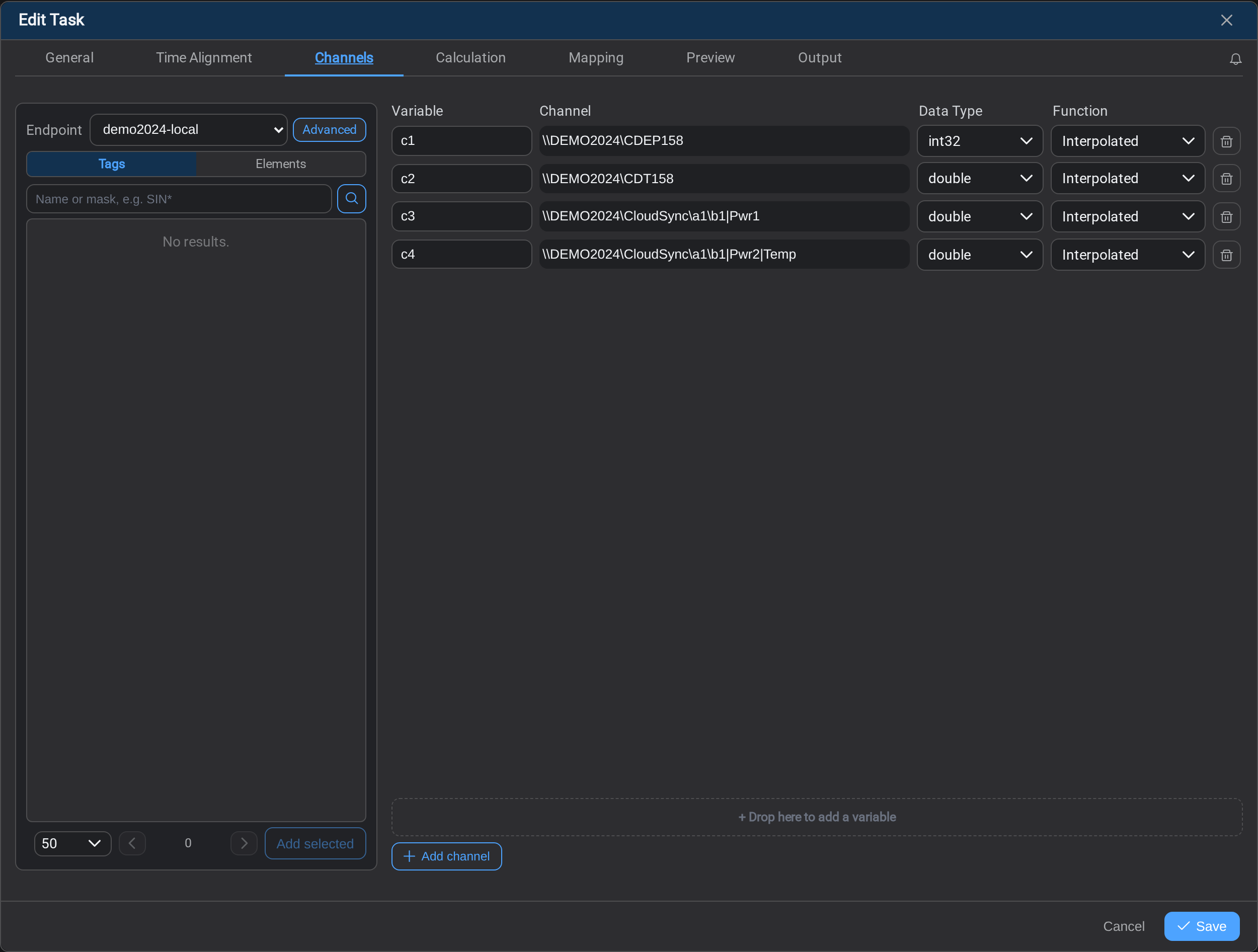
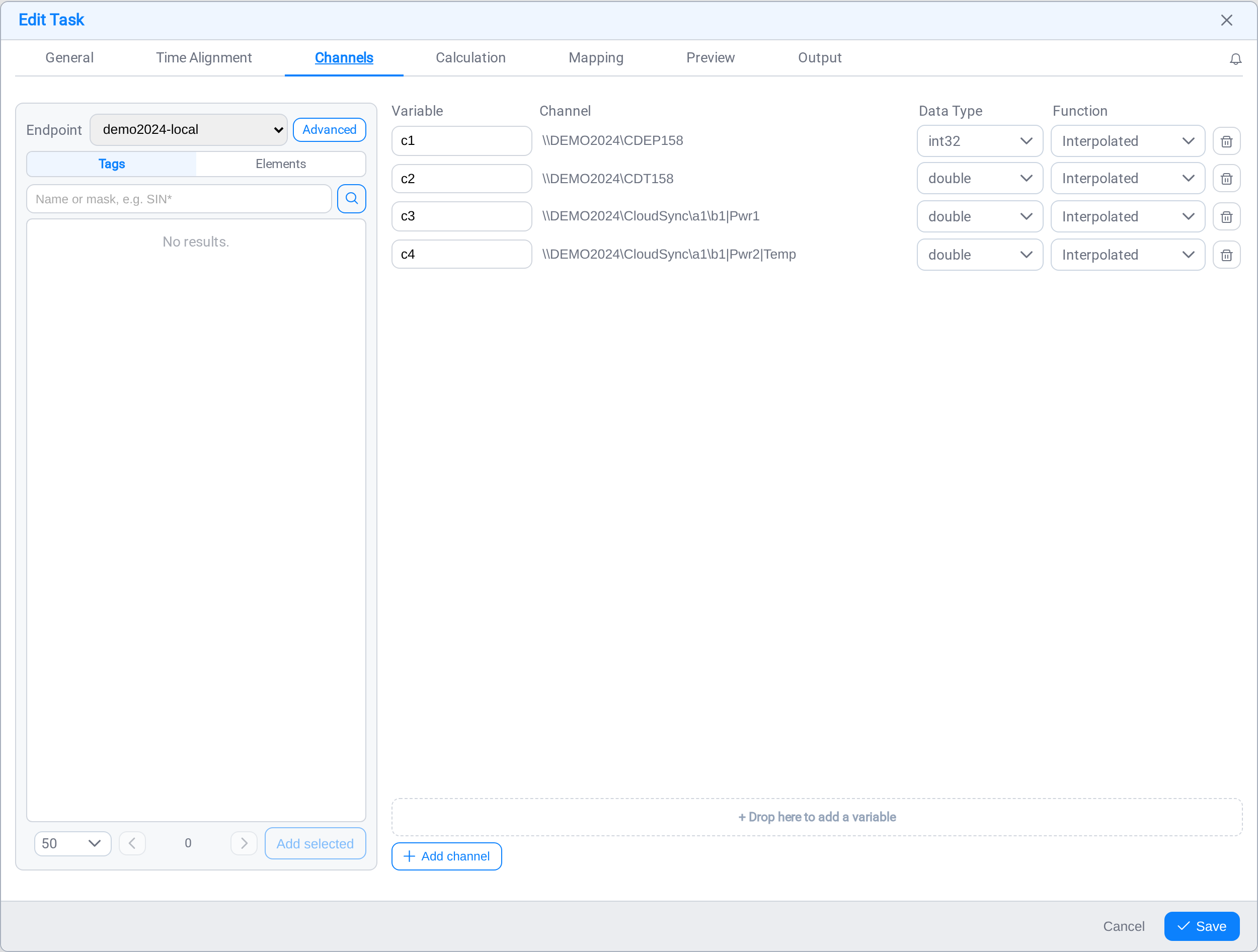
The left pane browses the endpoint you select at the top. Two tabs:
| Tab | Finds |
|---|---|
| Tags | PI points, by name or mask: SIN* finds everything starting with SIN |
| Elements | AF elements, so you can take a specific attribute off a specific asset |
Search, then drag a result into the grid on the right, or select several and use
Add selected. + Add channel adds an empty row you fill in by hand, which is
quicker when you already know the exact path.
Each row in the grid is one channel variable:
| Column | What it is |
|---|---|
| Variable | The name your calculation and mapping will use |
| Channel | The path being read |
| Data Type | What to treat the value as |
| Function | How the value is read onto the row's timestamp |
Tags and attributes look different
Both kinds sit in the same list, and you can tell them apart by the path:
\\DEMO2024\CDEP158                          a PI tag
\\DEMO2024\CloudSync\a1\b1|Pwr1             an AF attribute
A tag is \\server\tagname. An attribute is\\server\database\element\path|Attribute, where the | separates the asset path
from the attribute on it.
Mixing them freely in one task is fine.
Variable names
Channel variables are named c1, c2, c3 … by default, and that prefix is
deliberate. On a Pattern + Channels task the calculation also has variables bound
to pattern keys, and two variables with the same name is a configuration the service
cannot resolve. Keeping channels in their own namespace means the two sets cannot
collide.
Rename them to something meaningful (ambient, headerPressure), as you would any
other variable. Just keep them distinct from your pattern-derived names.
Function
Function decides how a channel's value is placed onto each row's timestamp, the
same way it does for pattern attributes. Interpolated computes a value between the
surrounding readings; Discrete holds the last reading.
Which functions are offered depends on the alignment mode; see
Time Alignment. Under Interval and Keys
only Interpolated and Discrete are honoured; the other modes read with a function
fixed by the mode itself.
Using channels downstream
Once a channel is declared here, it behaves like any other variable.
In a calculation, refer to it by name:
efficiency = (production - ambient) / productionwhere production came from a pattern attribute and ambient is a channel.
In a mapping, reference it as a token like anything else:[c1.value] for the reading, [c1.gmttime] for its timestamp. A channels-only task
maps exactly the same way a pattern task does; it simply has fewer slots to draw from
and produces one stream of rows rather than one per asset.
A channels-only task is therefore tags in, table or JSON out, with an optional
calculation in between and no asset modelling required.
Common mistakes
- Putting a per-asset value in a channel. It will read one asset's value and apply
it to every match. If it varies per asset, it belongs in the pattern. - Putting a shared value in the pattern. It works, but it forces the pattern to
reach somewhere it should not, and it is read once per match instead of once. - Leaving the default names on a combined task.
c1andx1in the same formula
six months later is unreadable. Name them for what they are. - Assuming a tag path is an attribute path. The
|is the difference. A path
without it addresses a tag, and the task fails at read time if that is not what
exists there.
What's Next
With the source settled, decide what the task computes. Continue to
Task Calculation →.
Related
- Tasks: choosing the source in the first place
- Asset Patterns: the other way to source a task
- Time Alignment: the Function column, and how rows are timed
- Task Mapping: writing channel values out